

Every GP practice in England and Wales, and some practices in Scotland, can help you order your repeat prescriptions online, through GP online services, the NHS App, the NHS website, or approved partner apps, such as Evergreen Life, which work with online pharmacy partners. This means, depending on what pharmacy you choose to use, you can get them delivered to your preferred UK address.
Some online pharmacies offer NHS prescription delivery at no extra delivery charge to the patient. If you usually pay NHS prescription charges in England, you’ll still need to pay the standard NHS prescription charge, unless you’re exempt or have a valid Prescription Prepayment Certificate (PPC).
You don’t have to write out a slip of paper and you don’t even have to phone or go into the surgery, saving you valuable time. Ordering digitally can also reduce problems linked to handwritten notes, because your request is sent directly through a structured online process.
The benefits of ordering repeat prescriptions via the Evergreen Life app
Convenient
With Evergreen Life, you can order repeat prescriptions online easily and safely. You can submit your request securely through the app 24/7, wherever you are. So, you can request repeat medicines at a time that works for you, including outside usual practice or pharmacy opening hours.

Your GP practice still needs to check and approve your repeat prescription request before the pharmacy can prepare your medicine. The practice will usually do this during normal working hours. This means online ordering is convenient, but it’s still important to order before you run out.
Better visibility
Using the Evergreen Life app to order your repeat prescriptions online also means you can record all your prescription requests in one place, with your other health information. This allows you to have better sight of your regular medications, helping you keep track of what you’re taking.
Ordering repeat prescriptions online can help reduce avoidable phone calls and paper requests for GP practices. It also gives you a clearer record of what you’ve requested, which can be especially helpful if you take several medicines or live with a long-term condition.
Streamlined and seamless
By moving routine requests to the more structured process of repeat prescription ordering, and choosing to order repeat prescriptions in the Evergreen Life app, you could make this ordering process even smoother.
So, if you’ve been wondering how do I order repeat prescriptions online and want a convenient way of doing do, just follow the steps below.
How to order your repeat prescriptions online
1. Before you start: link the Evergreen Life app to your GP record:
To request repeat prescriptions, you first need to download the Evergreen Life app and make sure your account is linked to your GP system. If you haven’t yet linked your account, you an link to your GP record remotely using NHS login by tapping the blue “Healthcare Services” section from the home screen of the Evergreen Life app.
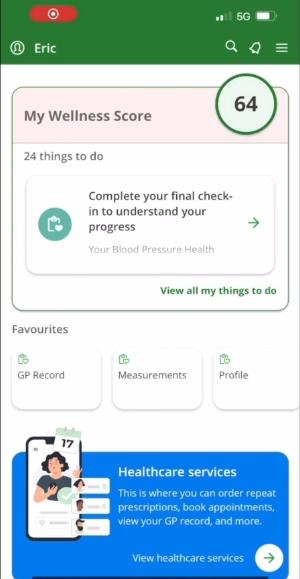
This is typically the simplest way to link your account, because you don’t usually need to ask your GP practice for registration codes, saving you and them time.
Alternatively, you can link using a registration letter that your GP practice can provide at your request. Simply go to the blue Healthcare Services section and tap ‘Link’, then enter the codes from your letter or email.
You can find more details on both ways of how to link your Evergreen Life app to your GP here.

If you don’t have a smartphone, you can always create an account and link via NHS login on the Evergreen Life website portal.
2. Find your list of repeat prescriptions:
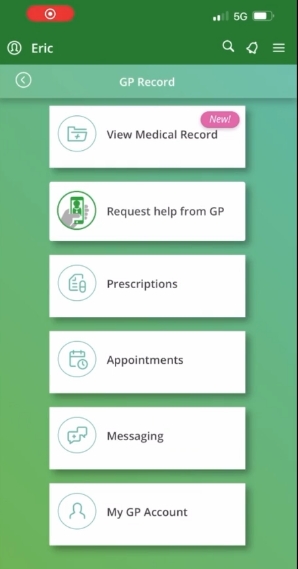
When you’re GP linked, if you tap on the blue “Healthcare Services” section from the home screen, you’ll see a tile labelled ‘Prescription’. Tap that to be taken to the Prescriptions area of your GP record. You can also get to the Prescriptions area by by tapping the magnifying glass icon at the top and searching for ‘order a repeat prescription’.
Once in the Prescriptions area, tap ‘Order new repeat’. There, you should see a list of your prescriptions from your GP record, including medicines that your GP Practice has made available to request as repeats. You may also be able to see recent prescription requests and their status.
Some prescribed medicines can interact with over-the-counter medicines, supplements, food or alcohol. If you’re not sure whether something is safe to take with your regular medicines, ask a pharmacist or your GP practice. You should also always let your doctor/pharmacist know about any over-the-counter medication or supplements that you take at your medication reviews to help them understand the full picture.
3. Select the medication you wish to request:
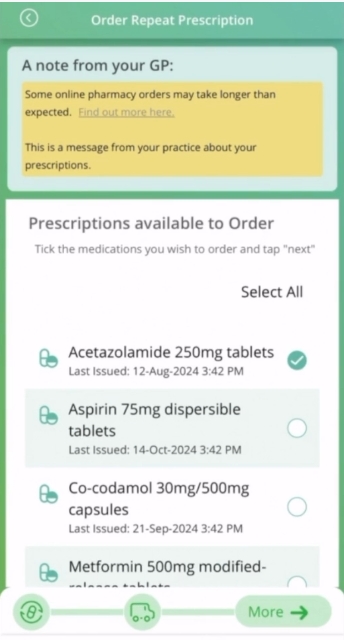
Within the medication list, you can see which medications you’re able to order online. Simply, tick the medications you want to request.
How to get prescriptions delivered
Ever wondered ‘can I get prescriptions delivered?’ Yes, you can!
Some people prefer using a local pharmacy because they value face-to-face advice and local collection. Some local pharmacies may also offer delivery, although this varies by pharmacy and area. Others prefer using an online pharmacy because delivery is built into the service and can save time and travel. Choose the option that works best for you.
Delivery options may vary depending on the pharmacy, your address, the medicine, and whether the prescription request is approved by your GP practice.
You are free to choose the pharmacy or online pharmacy that works best for you. You should not feel pressured to use a particular pharmacy or online pharmacy as your nominated (chosen) pharmacy, and you can change your nominated pharmacy at any time.
4. Choose your preferred delivery option:
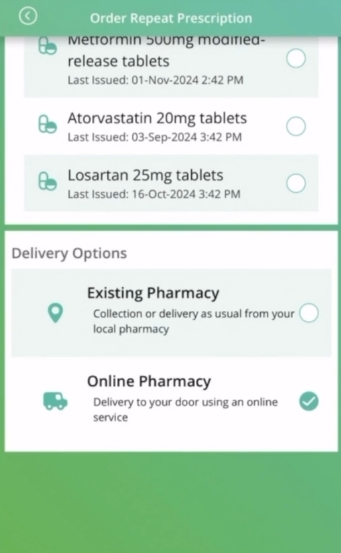
If you’d prefer your local pharmacy, select ‘Existing Pharmacy’ under ‘Delivery Options’ in the Evergreen Life app when requesting your repeat prescriptions. However, if you’d rather use an Online Pharmacy to get prescriptions delivered, select this option.
5. Confirm and place your request:
Tap ‘next’ and confirm that the prescription you’re requesting from your GP practice is correct.
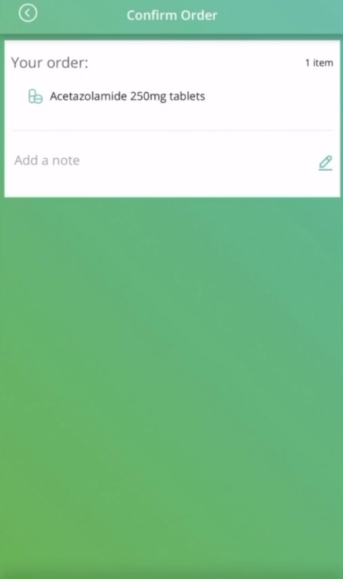
Here, you can type any extra information about your prescription that you’d like your GP practice to see that can help them process your prescription request correctly. For example, “I need more as I’m going on holiday”.
When you’re happy, tap ‘Order prescription’ then ‘place order’.
6. Choose your preferred provider (if you’ve selected ‘Online Pharmacy’ in step 4):
Select which of our online pharmacy partners suits your needs best:
Chemist4U delivers NHS prescriptions to any UK address you specify within 4-5 working days. Their delivery service is discreet and uses a trusted Royal Mail tracked service, keeping you updated along the way.
PillTime delivers prescriptions their original packaging to your chosen UK address too. They also offer an optional pouching service, where eligible tablets and capsules are organised into clearly labelled, dated daily pouches to help make medication routines easier to manage (charges may apply). You’ll receive a cardboard dispensing box with your first order and ongoing deliveries in recyclable pouches, which you simply add to your empty dispensing box. This reduces cardboard waste.
Delivery is within10 days but this service may be useful for people living with a long-term condition or who take several regular tablets or capsules that need to be taken at various intervals throughout the day. Some medicines, such as liquids, creams, inhalers or other non-tablet items, can’t go into pouches and can be supplied separately where appropriate.
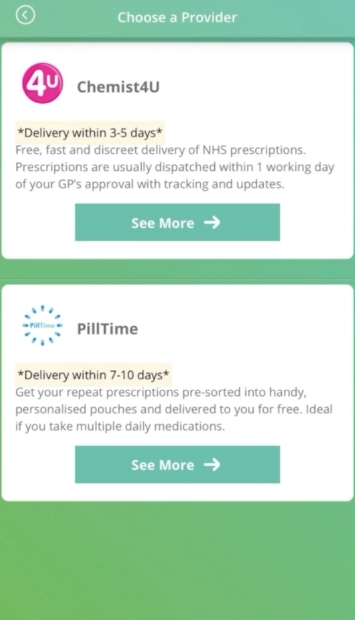
Both our online pharmacy partners offer NHS prescription delivery at no extra delivery charge to you. If you usually pay NHS prescription charges in England, those charges still apply unless you’re exempt or have a valid Prescription Prepayment Certificate.
7. Enter your delivery details and payment information (if applicable to you)
Your repeat prescription request has been made!
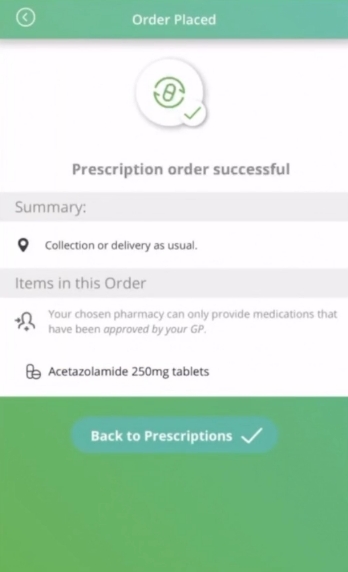
It’s as easy as that. Once you’ve submitted your online prescription request, your GP practice will check it. For this reason, it’s important to bear in mind that you’re not making an automatic medicine order, but a request to your GP practice.
8. Track your repeat prescription request:
Your request may be approved, rejected, or delayed. For example, your GP practice may need to check whether:
- you’re requesting your medicine too early
- a medication review is due
- you need a blood test or blood pressure check before more medicine can be issued
You can track the details of your request and its status in the Prescriptions area of the app.
You can watch a demo of the above how to order repeat prescriptions in the Evergreen Life app journey here.
If you run into a problem:
If you are about to run out of an important medicine, contact your GP practice urgently. If it is out of hours, use NHS 111 online or call 111 for advice. This is especially important for insulin, epilepsy medicines, steroids, anticoagulants, Parkinson’s medicines, inhalers, and some mental health medicines. Do not wait for a routine online request if missing the medicine could put your health at risk.
Please note, sometimes a pharmacy may not have a medicine in stock straight away. If your medicine is urgent, or you are told there will be a delay, contact the pharmacy or your GP practice for advice.
Keep track of your medicines with the Evergreen Life app: Easy. Efficient. Secure.
Start taking control of your own healthcare with the Evergreen Life app. You can even benefit from the app’s medication diary feature to remind you to take your medicines as prescribed. Recording when you’ve taken your medicines can help reduce the risk of missing a dose or accidentally taking an extra one.
| Evergreen Life app feature | Benefit |
|---|---|
| Submit your repeat prescription request securely 24/7, wherever you are, at a time that works for you, including outside usual practice or pharmacy opening hours. | While your GP practice still needs to check and approve your request before your pharmacy can prepare your medicine (usually done during normal working hours), you enjoy added convenience. |
| Type any extra information about your prescription that you’d like your GP practice to see e.g. “I need more as I’m going on holiday”. | Helps your GP practice process your prescription request correctly first time. |
| Repeat prescription request status tracking | Being able to check if your request may be approved, rejected, or delayed keeps you informed, so you can take action if needed. |
| Your repeat prescription requests are all in one place with your other health information. | Allows you to have better sight of your regular medications, helping you keep track of what you’re taking – can be especially helpful if you take several medicines or live with a long-term condition. Can also be useful to show in medication reviews. |
| Medication diary | Reminds you to take your medicines as prescribed. Plus, recording when you’ve taken them can help reduce the risk of missing a dose or accidentally taking an extra one. |
Reviewed by:
Dr Claire Marie Thomas MRCGP DFSRH DTMH DipNLP MBChB BMedSci Clinical Content Lead
- GOV.UK (n.d.) Get a prescription prepayment certificate.
- NHS Business Services Authority (n.d.) Help with NHS prescription costs.
- NHS (2023) NHS prescription charges.
- NHS (2023) Save money with a prescription prepayment certificate (PPC).